Zero Middleman Servers
Saphirium connects directly from your computer to official Google services. We run no developer backend servers, ad networks, or hidden analytics.
Calendar, tasks, and video calls in frosted glass on your Windows 10/11 desktop — summoned over any window or pinned gracefully to your wallpaper, with zero browser tabs.
Try it right now: press Alt + C on your keyboard
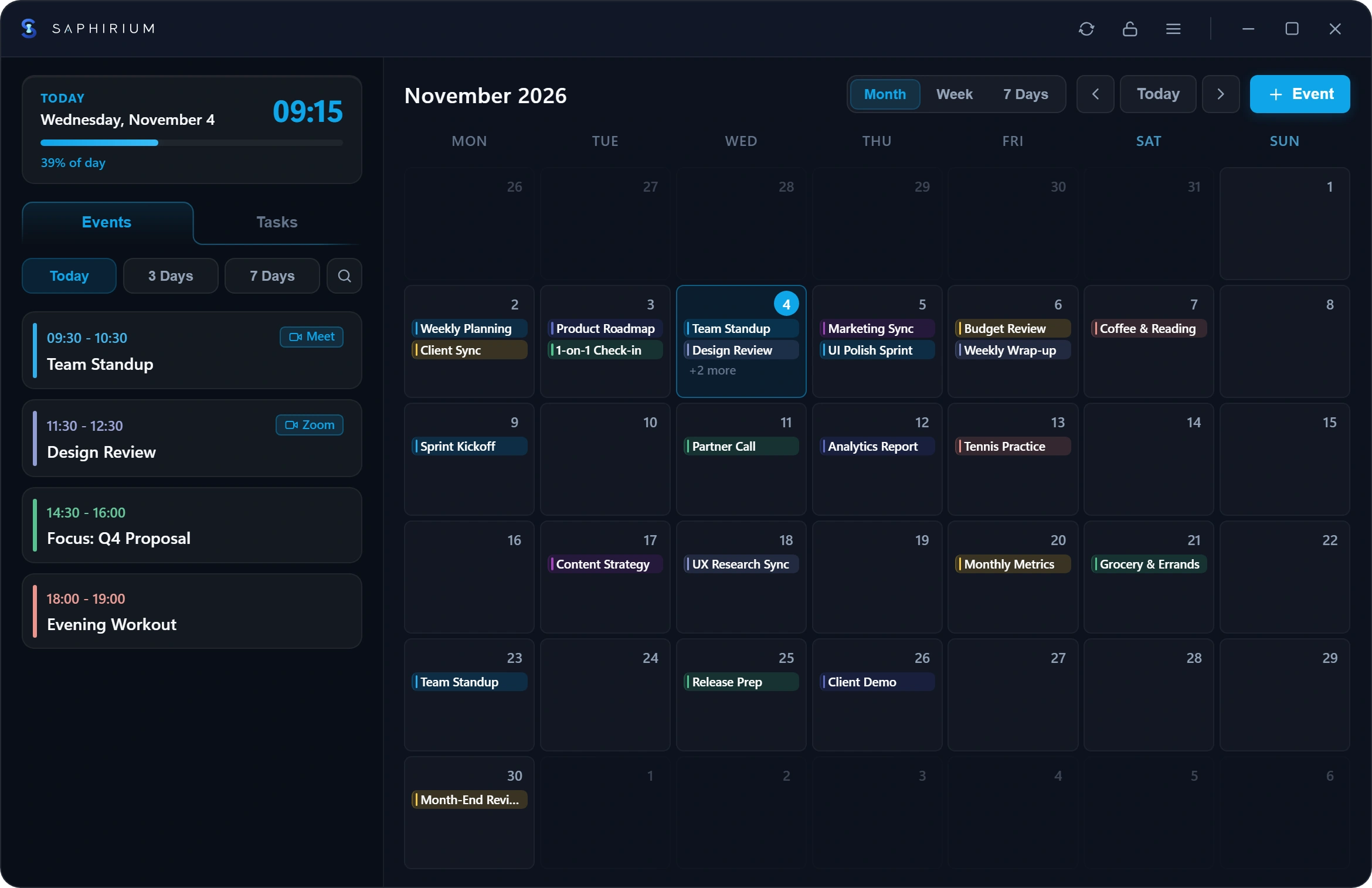
Calendar, tasks, instant search, and meeting links — brought together in one clean glass window on your desktop.
Working in documents, spreadsheets, mail, or your browser — Alt + C smoothly brings Saphirium above your active window on any keyboard layout. Click back into your work and it quietly settles back onto your desktop.
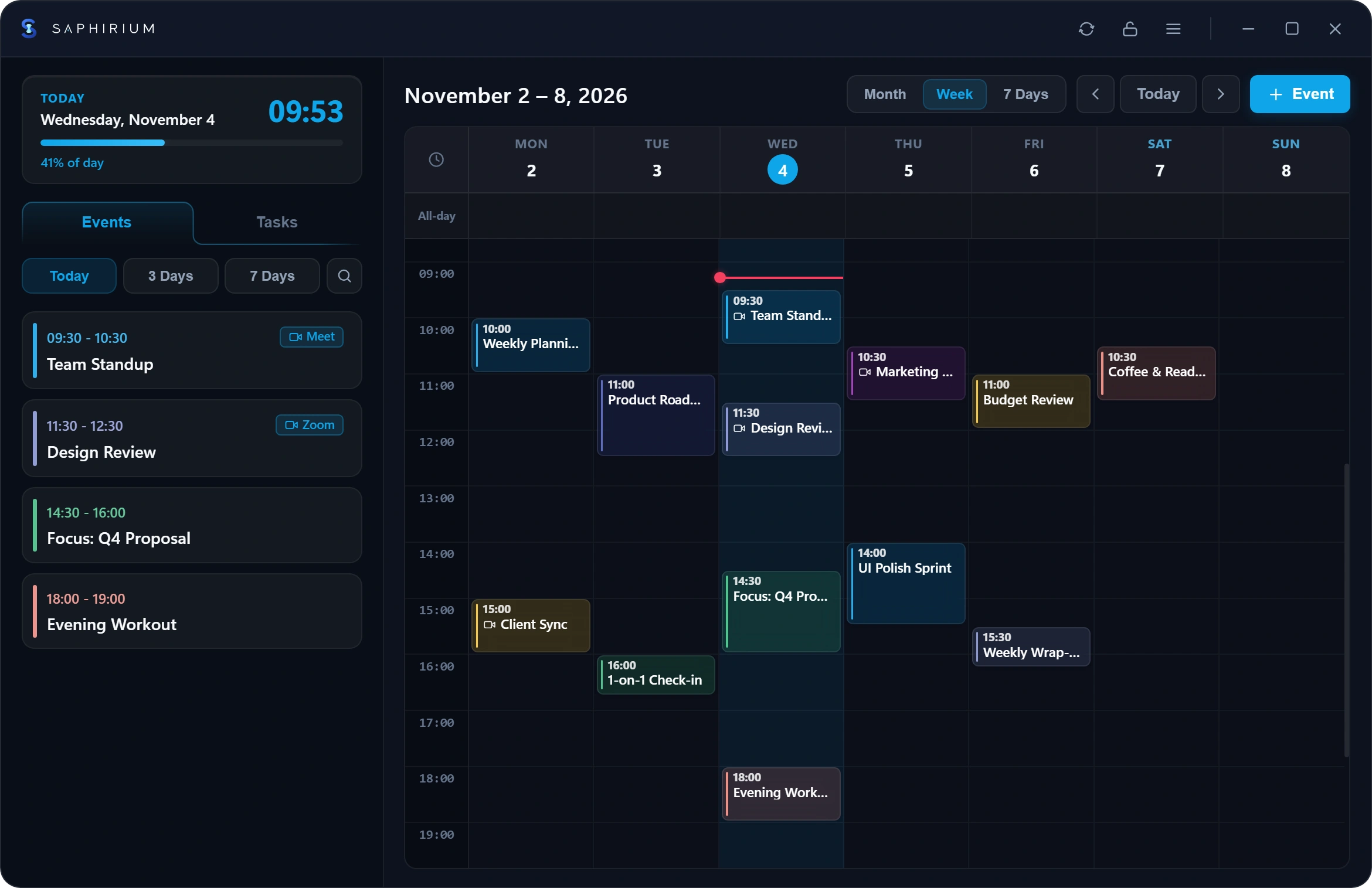
Keep lists, subtasks, and notes organized, then simply drag any item onto an open day or hour in your calendar. Saphirium schedules the event and checks off the task automatically. Try it live below.
8 deep dark palettes, 4 crisp frosted lights, and 8 soft pastels with adjustable 40%–100% background opacity. While dragging the opacity slider in the app, the settings window temporarily turns transparent so you can tune against your live wallpaper.
Create Google Meet links in a single click, while Microsoft Teams, Zoom, and Google Meet links are recognized automatically — placing a clean join button right inside native Windows notifications.
 Saphirium✕Saphirium✕
Saphirium connects directly from your computer to official Google services. We run no developer backend servers, ad networks, or hidden analytics.
Authorization tokens are stored locally on your PC in encrypted form using native Windows Data Protection (DPAPI) tied to your Windows user account.
Use Saphirium 100% locally without any account, or create and edit events offline on the go — queued updates sync automatically once Wi-Fi returns.
Started planning locally on your PC and want to sync with your phone later? Transfer your local events and tasks to Google in a single click.
A live clock and subtle Day Progress bar in the sidebar show how much of the day remains, while quick Today · 3 Days · 7 Days filters keep upcoming plans effortless to scan.
Switch layouts with keys 1 / 2 / 3, hide quiet night hours (00:00–06:00), and drag across hourly slots to schedule multi-hour blocks.
Cleared tasks and deleted events dissolve into hundreds of glowing sapphire shards matched to the card color. Click this card!
Personalize event cards with a classic stripe, subtle outline, solid fill, or the signature Saphirium diamond across 11 Google colors.
Finds any meeting or task in a split second across your local cache and up to 30 years of calendar history.
Organize multiple task lists, nested subtasks, notes, custom order, and dedicated deadline reminders.
Simply roll your mouse wheel over start/end times, dates, or themes — event duration adjusts automatically.
Tuck away from the Windows taskbar into the system tray, lock position with Ctrl+L, and auto-recover bounds when unplugging monitors.
Opens immediately from local cache, pauses background timers while your laptop sleeps, and refreshes smoothly upon waking.
Complete localization in 24 languages out of the box — automatically matching 24-hour or AM/PM clocks and Monday/Sunday week start.
Everything Saphirium supports right out of the box on your Windows PC.
Note: Cloud calendar synchronization is purpose-built for Google Calendar and Google Tasks (alongside full standalone Local PC mode).
Strictly a one-time purchase — zero monthly subscriptions, zero ads, and no hidden fees. Microsoft Store automatically displays the regional price in your local currency, with future updates included.
Yes! You can use Saphirium 100% locally on your PC without signing into any account. And if you connect Google and go offline, you can still add and edit events and tasks — the offline queue syncs everything automatically once your connection returns.
Never. Saphirium has no developer backend servers, analytics, or trackers. Your PC communicates directly with official Google services over encrypted HTTPS, and authorization tokens are protected locally by Windows.
Place the widget anywhere on your screen and press Ctrl + L (or click the lock icon in the header) to lock its position and size. In Settings, you can hide it from the taskbar into the system tray and enable Launch at Startup.
Cloud synchronization is purpose-built for fast, reliable sync with Google Calendar and Google Tasks, alongside full standalone Local PC storage. Meeting links for Microsoft Teams, Zoom, and Google Meet inside your events are detected automatically.
Yes, it runs smoothly on both Windows 10 and Windows 11. Saphirium opens instantly from local cache, pauses background timers when your laptop sleeps, and stays lightweight all day.
Install Saphirium — keep your schedule and tasks gracefully on your wallpaper or one Alt + C away.
Get it fromMicrosoft StoreWindows 10 / 11 · One-time purchase, zero subscriptions · Trusted install & updates via Microsoft Store
Saphirium